
Most question types are autoscored - excluding Essay, Audio and Image Highlight questions. Each auto scored question type has validation settings. Authors can select the scoring type, enter the points for the question, enter penalty points for the question, and enable a 'check answer' button. Those settings can be found at the bottom of the question editor under More Options.
Scoring
In most cases questions can be validated using three scoring methods: Exact Match, Partial Match Per Response, or Partial Match. Some question types, such as Classification and Order List, have additional scoring methods.
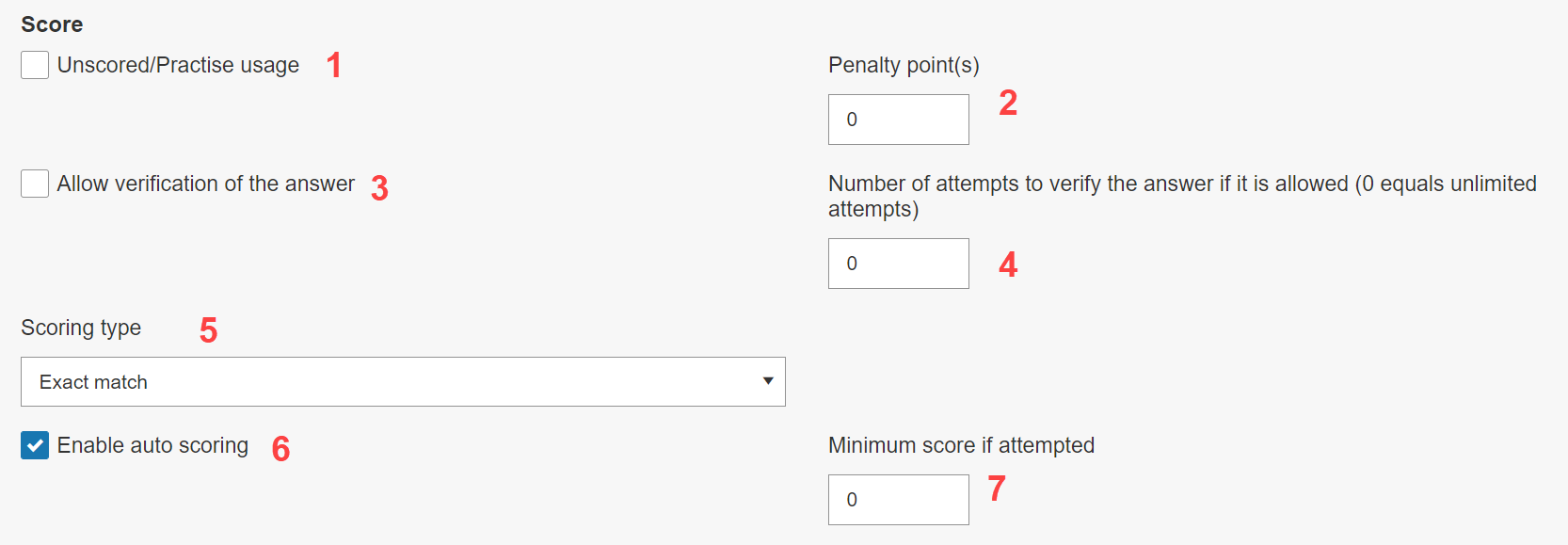
- Unscored/Practice usage: Specify that the question should not have a points value. When this is enabled, the fields for assigning points to correct answers will be greyed out.
- Penalty point(s): Set a penalty for incorrect answers. This setting is sensitive to the scoring types. The use of penalty points is also explained further below.
- Allow verification of the answer: If this is enabled, a Check answer button will appear to the participant alongside the question; clicking this button will indicate to the learner if their answer is correct or incorrect, but it will not tell them the correct response. This can be useful for informal assessment. The manager needs to enable this functionality as well on the flow level under the participation settings.
- Number of attempts to verify the answer if it is allowed: The value entered here will indicate how many times the learner can use the Check answer button. A value of 0 indicates an infinite number of times.
The Different Scoring Types
Choose between scoring types:- Exact match: point(s) are only awarded if the question is answered exactly as defined in the correct response schema.
- Partial match per response: when the question has multiple responses available, point(s) are awarded for each response as defined by the correct response schema.
- Partial match: the points are split between the correct answered as defined by the correct response schema (e.g. 2 points is split between two responses so they each give 1 point).
- Rounding is only available when this scoring type has been selected. There are two options to select from the drop-down menu:
- None: will round the score to four decimal places
- Round down: will round the score down to the nearest whole number, e.g. a score of 2.666 will be rounded down to 2.
- Rounding is only available when this scoring type has been selected. There are two options to select from the drop-down menu:
- Partial Pairwise Per Response (Only on Order Type questions): Entities are compared in pairs to determine the score.
Scoring types only available on Classification questions:
- Exact Match: Participants must answer all parts of the question correct to receive a point.
- Partial Match Per Cell: Each cell of the table will be scored individually and a point will be awarded for each cell.
- Partial Match Per Cell - Max Score: Each cell of the table will be scored individually and the overall question score will be divided between cells.
- Partial match Per Element: Each response element will be awarded an individual point.
- Partial Match Per Element - Max Score: Each element of the table will be scored individually and the overall question score will be divided between elements.
Using Penalty Points
Penalty points are deducted from the participant's points for each incorrect response on a question. Penalty points can behave differently, depending on the scoring type:
- Penalty Scoring with Exact Match
- Penalty Scoring with Partial Match per Response
- Penalty Scoring with Partial Match
Penalty Scoring with Exact Match
If the participant answers any of the responses incorrectly, the pre-defined penalty point(s) will be deducted for the question.
Example:
- 3 points are set for the correct answer(s)
- Penalty point(s) is set to 3.
- 4 answer options are available to participants.
- Choice A, Choice B, and Choice C are the correct answers.
- Selecting Choice D, either on its own or alongside other options, will give the learner a score of 0/3.
Selecting Choice A, Choice B, and Choice C will award the participant with the full score = 3/3 points. Selecting Choice D alongside these options will deduct 3 points from the overall score, leading to a final score of 0/3.
Selecting Choice A and Choice B will award the participant with no points, as not all correct answers have been selected. This means that choosing Choice D, an incorrect option, will not affect the score of 0.
Penalty Scoring with Partial Match per Response
For each incorrect response, the participant will receive a deduction of points based on the pre-defined penalty point(s).
Example:
- 3 points are set for the correct answer(s)
- Penalty point(s) is set to 3.
- 4 answer options are available to participants.
- Choice A, Choice B, and Choice C are the correct answers.
- Selecting Choice D, either on its own or alongside other options, will deduct 3 points from the overall Question score.
Selecting only the correct options A, B and C will give the participant an overall score of 9/9 (each option is worth 3 points). Selecting only some of the correct options will award the participant 3 points per response, i.e. selecting Option A and C will amount to 6 points.
Selecting a wrong answer alongside the correct answers will deduct 3 points from the overall score. The learner will receive a score of 6/9 if Option A, B, C and D are selected (9 points for A, B, C and minus 3 points for D).
Penalty Scoring with Partial Match
For each incorrect response, the participant will receive a deduction of points based on the pre-defined penalty point(s). If rounding has been enabled, it will also apply to the penalty score, i.e. penalty points are divided by the number of correct options on the question.
Example 1:
- 3 points are set for the correct answer(s)
- Penalty point(s) is set to 3.
- 4 answer options are available to participants.
- Choice A, Choice B, and Choice C are the correct answers.
- Selecting D, on its own or alongside other options, will deduct 1 point from the overall Question score.
- In this case, the rounding option doesn't make a difference.
Selecting only the correct options will award the participant a score of 3/3.
Selecting only some of the correct options will award the participant a point of 1 for each correct answer. In this case the participant receives a score of 2/3.
Selecting a mixture of correct and incorrect responses will both award and deduct points. In this example, the participant receives 1 point for each correct answer (Choice A and Choice B), leading to a score of 2/3. The learner has also selected an incorrect answer, Choice D, which will deduct 1 point from the score of 2/3. The participant's final score in this example is 1/3.
Example 2:
- 3 points are set for the correct answer(s)
- Penalty point(s) is set to 6.
- 4 answer options are available to participants.
- Choice A, Choice B, and Choice C are the correct answers.
- Selecting D, on its own or alongside other options, will deduct 2 points from the overall Question score.
- The value of 2 points is calculated by applying Partial Match scoring to penalty score of 6, so each incorrect response will subtract 2 points.
- In this case, the rounding option doesn't make a difference.
If, a mixture of incorrect and correct options have been selected (Option A, B, C and D), the final score will be 1/3. In this case, Choice A, Choice B, and Choice C all carry 1 point each, leading to a score of 3/3. Because Choice D, an incorrect option, has also been selected, 2 points will be deducted from the overall score.
Layout
Edit the visual layout of the options in the question. The layout options are very distinct for each question type.
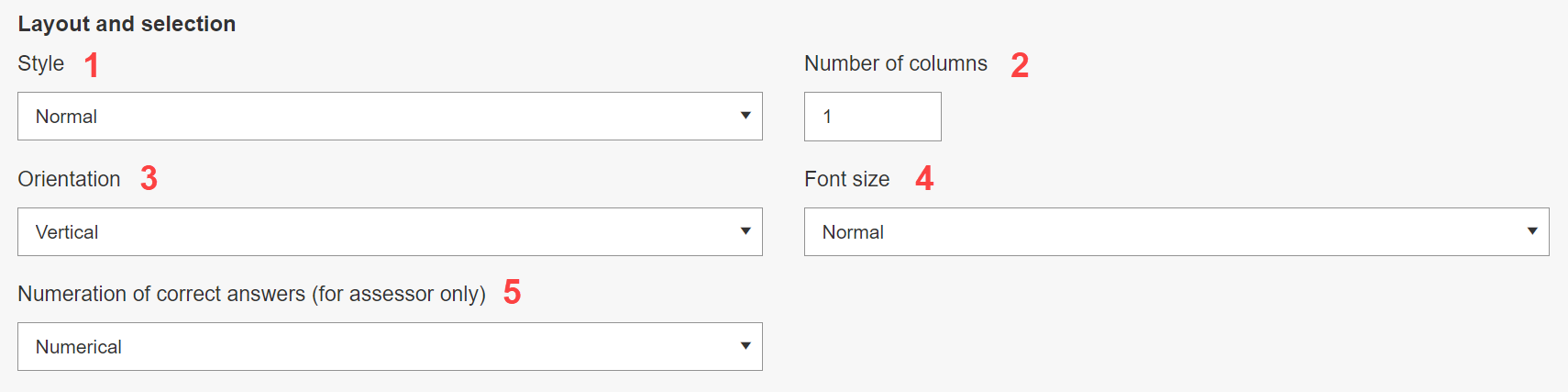
- Change the overall layout of the question options from the standard block layout to more point checks and with alignment.
- Number of columns (e.g. change from a 1x4 to a 2x2 grid).
- With more than one column, choose whether the order of the questions (e.g. A, B, C, D) should be horizontal or vertical.
- Font size for the question options.
- Label type for each option (numbers, upper- or lowercase letters).
On Classification questions only:
-
Maximum responses per cell: Limits the number of possible responses a cell can have. When the field is empty or set to 0, unlimited responses can be dragged into a cell.
-
Response container position: Choose where to position the possible responses container. Options include Top, Bottom, Left and Right.
- Row header: Will be displayed on top of the row. If there is no row title this attribute will be ignored.
- Row Min Height and Row Titles Width can be specified. Both values should be in entered in pixels.