
This release migrates the Support role to a modern technical foundation — a significant step that expands what's possible for supporter tools going forward.
Alongside the migration, we've refreshed the view and added several customer-requested enhancements to make everyday work easier and more efficient for users with the Support role. These improvements reflect our commitment to acting on customer feedback and continuously improving the product experience.
What is changing for Supporters?
Supporters will see a cleaner, faster, and more reliable experience with clearer navigation and improved table functionality.
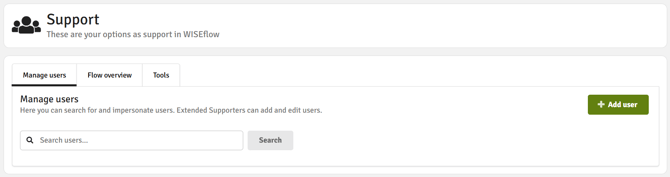
The Supporter area will be organised into three tabs, each with a heading and description:
-
Manage users: The current "Search user" and "Add user" will be combined into a single tab "Manage users". The table will support attribute-specific search, per-column filtering, up to 500 results, a total-found count, and a warning when Supporters must refine their search. New columns will show Last login, Creation date, and Access token. Supporters with the required access will still be able to add users from this tab.

-
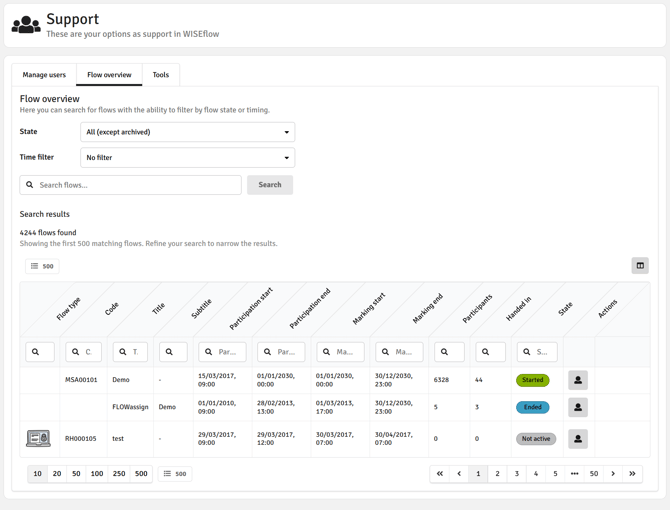
Flow overview: The table will include per-column filtering, improved result-limit handling, and new columns for Subtitle, Flow type, Manager, and Assessor.
-
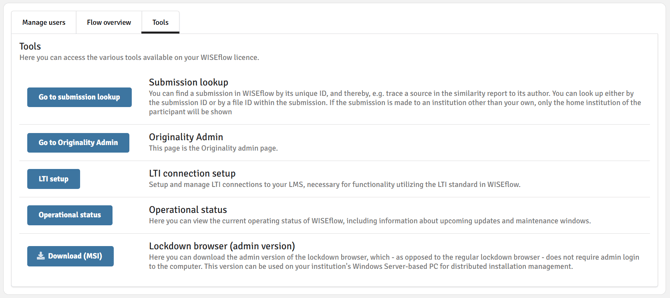
Tools: Operational Status and Lockdown browser (admin version) will move into the Tools tab. Customers with the relevant setup / modules will also find link to the Originality dashboard, LTI setup and the submission lookup there.
When searching for a user or a flow, Supporters must click Search to start a search.
What stays the same?
The Supporter role permissions and access model are not changing, existing access and visibility permissions will be preserved. Supporters will continue to see only the functionality they are authorised to access.
The following capabilities remain available to Supporters with the required access:
-
User management, including searching for users, editing user details, managing access tokens, activating users, and adding users.
-
Flow overview functionality, now supported by improved filtering, result handling, and additional columns.
-
Existing tools, now grouped more clearly under the Tools tab where relevant.
Additional improvements to organisational management in WISEflow will continue to be developed in subsequent releases.
We recommend informing Supporters that the area will look familiar but will be organised into clearer tabs, including Manage users and Tools, so they understand the navigation changes before the release.
If you have any questions about these changes, please reach out to your UNIwise contact or submit a ticket through the WISEflow Service Centre.