
This article has been updated to reflect the enhancements that will be available after Friday 30 January as part of the January 2026 Release.
An alternative grade is a grade that can be issued by managers and assessors. Rather than an achieved grade, an alternative grade can be used to indicate situations such as non-attendance or illness in relation to a participant/student.
Alternative grades and assessors both need to be set up on the WISEflow licence first before they can be awarded by an assessor as part of the marking process. Please contact your Licence Administrator if this is something you think you should be able to do.
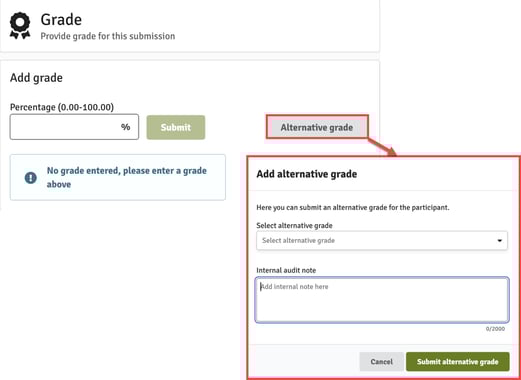
In the marking tool, navigate to the grade window by clicking on the  button in the top right-hand corner. If alternative grades have been set up on your institution's licence, and assessors have been granted permission to award alternative grades, you will see a button marked Alternative grade. Click on the button to open a window with a drop-down list of all the alternative grades available to you on your institution's licence.
The drop-down list will offer a selection of bespoke grades that have been set-up by your Licence Administrator. Only your Licence Administrator can update/amend these options. You can find out more about this here.
Once you have selected an alternative grade, the grade can be submitted by clicking the Submit alternative grade button.